Before you start
Live online collection is not active. Do not enter real card details or tell clients that BookVaya has charged them.
Choose the payment arrangement
Open Settings → Manage payments → Appointment payments. Review the choices for pay later, a deposit or full payment. These settings do not activate online collection by themselves.
Check what remains due
When a payment connection is active, the appointment shows Remaining balance after payments already recorded. Compare that amount with the service price before asking for more money.
Review a recorded payment
Open Payments to review → Review payment when available. Check the appointment reference, payment status and amount before taking action.
Check a refund separately
If a refund option is available, review the amount and original payment method before requesting it. Check Refunded or Refunds in progress afterward. Cancelling an appointment does not itself mean a refund was issued.
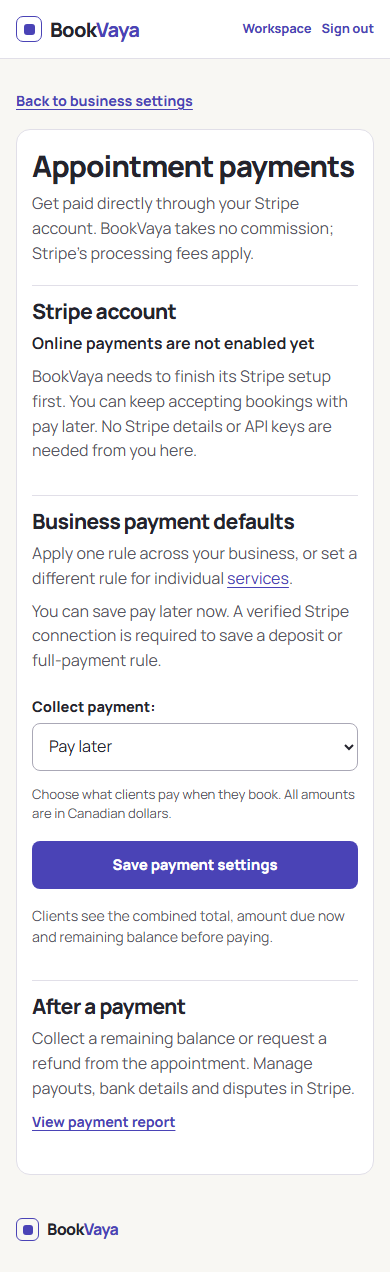
Check the payment connection first
- Read the Stripe account status.
- Choose how you want clients to pay under Collect payment.
- Save payment settings. Deposits and full payment need an active connection.
Tap the image to open it at full size in a new tab.
What you should see
You can distinguish the appointment price, any recorded payment, the remaining balance and a requested or completed refund.
If you need help
Online payment is not available
Live online collection is not active. Agree another way to pay with the client; saved settings do not mean a payment connection is ready.
The balance or refund status is unclear
Open the appointment and review Remaining balance, Refunded and Refunds in progress. Use Review payment or refund if shown. Do not repeat a charge or refund while the result is uncertain.
Still need help?
Send your question to the BookVaya team through Fisher Digital Design. Tell us what you tried and what happened.
Contact BookVaya support